
第 2 課
Create accounts and send XRP
Create an account on the XRPL Testnet and transfer XRP between two accounts.

This lesson shows how to:
- Create accounts on the Testnet, funded with 930 test XRP with no actual value.
- Retrieve the accounts from seed values.
- Transfer XRP between accounts.
Try editing some code: get-accounts-send-xrp.js
The interactive code example below can be used with any XRP Ledger network: Testnet, Devnet, or Mainnet. When building on your own, you can update the code to choose different or additional XRP ledger networks.Open the Token Test Harness and get test accounts:
- Open the code sandbox.
- Choose Testnet.
- ClickGet New Standby Account.
- ClickGet New Operational Account.
- Copy and paste theSeedsfield in a persistent location, such as a Notepad, so that you can reuse the accounts after reloading the form.
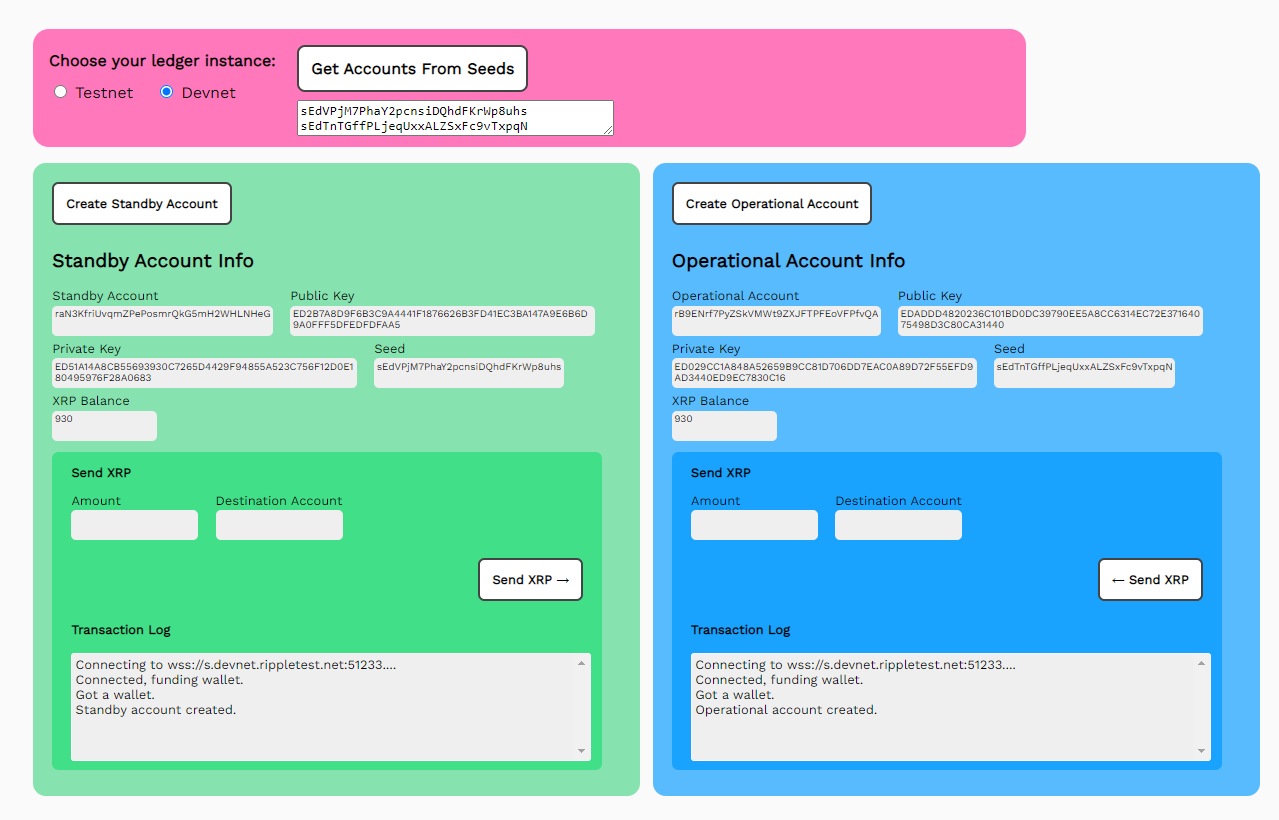
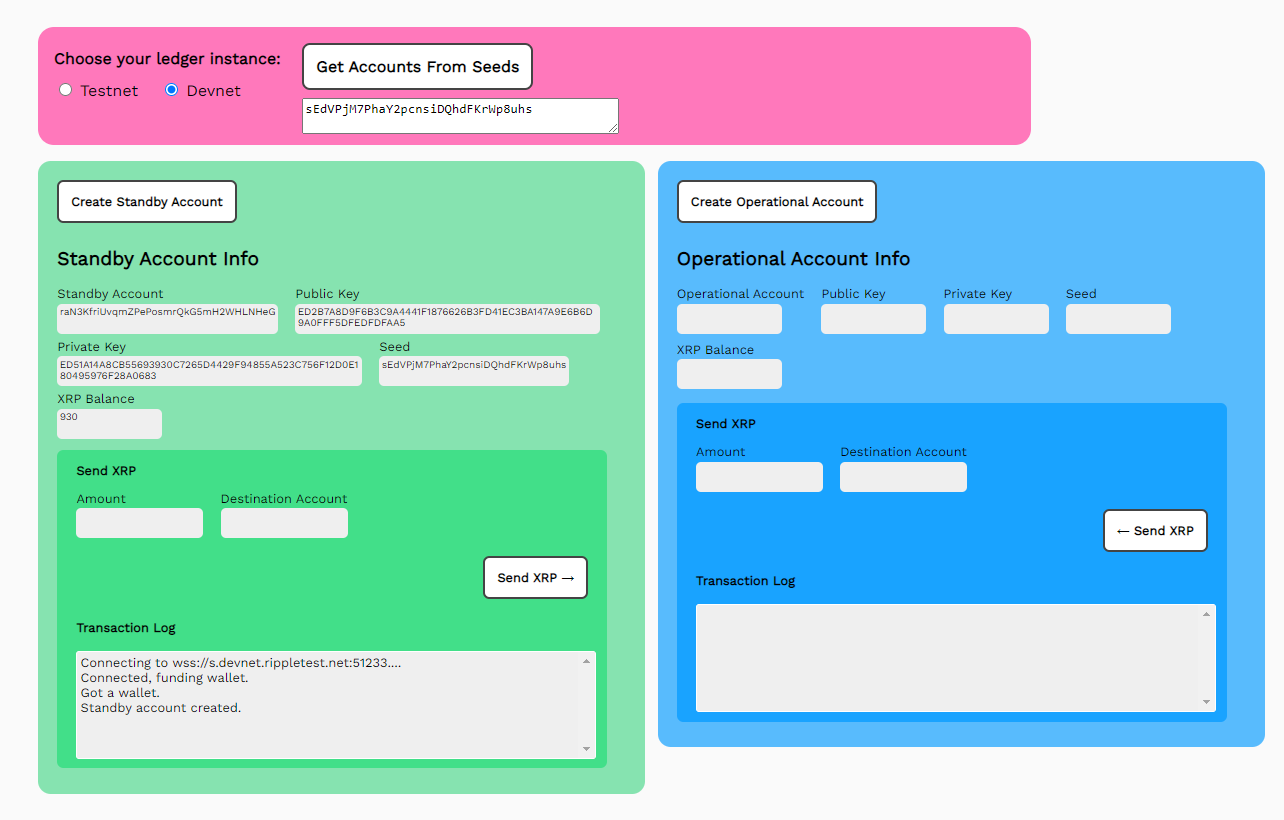 You can transfer XRP between your new accounts. Each account has its own fields and buttons.
To transfer XRP between accounts:
You can transfer XRP between your new accounts. Each account has its own fields and buttons.
To transfer XRP between accounts:
- Enter theAmountof XRP to send.
- Enter theDestinationaccount (for example, copy and paste the OperationalAccount Fieldto the StandbyDestinationfield).
- ClickSend XRP>to transfer XRP from the standby account to the operational account, or<Send XRPto transfer XRP from the operational account to the standby account.
JavaScript code walkthrough: get-accounts-send-xrp.js
This example can be used with any XRP Ledger network: Testnet, Devnet, or Mainnet. You can update the code to choose different or additional XRP Ledger networks.The getNet() function uses brute force if statements to check the radio button values, set the selected network instance and return the URI.
The getAccount() function starts by getting the selected ledger with getNet().
Instantiate a client.
Then use the results variable to capture progress information.
Reporting the results variable to the results HTML field.
Connect to the server.
Create and fund a test account wallet.
Get the current XRP balance for the account, and if this is a standby account, populate the standby account fields.
Otherwise, populate the operational account fields.
Insert the seed values for both accounts as they are created to the Seeds field as a convenience. You can copy the values and store them offline. When you reload this form or another in this tutorial, copy and paste them into the Seeds field to retrieve the accounts with the getAccountsFromSeeds() function.
Define Form Fields
Throughout the code, we use a JavaScript function document.getElementById(), which is used to target an HTML element by it’s CSS ID. We use these functions to set and get values in the HTML form fields of the Token Test Harness. To preserve the legibility of the code, we’ve defined some constants to replace these function calls.
// *** Define HTML Form Fields **
const xls = document.getElementById("xls")
const tn = document.getElementById("tn")
const dn = document.getElementById("dn")
const standbyResultField = document.getElementById('standbyResultField');
const operationalResultsField = document.getElementById('operationalResultField');
const standbyAccountField = document.getElementById('standbyAccountField');
const standbyPubKeyField = document.getElementById('standbyPubKeyField');
const standbyPrivKeyField = document.getElementById('standbyPrivKeyField');
const standbyBalanceField = document.getElementById('standbyBalanceField');
const standbySeedField = document.getElementById('standbySeedField');
const operationalAccountField = document.getElementById('operationalAccountField');
const operationalPubKeyField = document.getElementById('operationalPubKeyField');
const operationalPrivKeyField = document.getElementById('operationalPrivKeyField');
const operationalSeedField = document.getElementById('operationalSeedField');
const operationalBalanceField = document.getElementById('operationalBalanceField');
getNet() and getAccount(type)
// ************* Get the Preferred Network **************
    function getNet() {
        let net
           if (tn.checked) net = "wss://s.altnet.rippletest.net:51233"
           if (dn.checked) net = "wss://s.devnet.rippletest.net:51233"
           return net
        } // End of getNet()

// *******************************************************
// ************* Get Account *****************************
// *******************************************************

  async function getAccount(type) {
      let net = getNet()

      const client = new xrpl.Client(net)
        results = 'Connecting to ' + net + '....'

        // This uses the default faucet for Testnet/Devnet
        let faucetHost = null
        if(document.getElementById("xls").checked) {
            faucetHost = "faucet-nft.ripple.com"
        }
        if (type == 'standby') {
          standbyResultField.value = results
        } else {
          operationalResultField.value = results
        }
        await client.connect()

        results += 'nConnected, funding wallet.'
        if (type == 'standby') {
          standbyResultField.value = results
        } else {
          operationalResultField.value = results
        }

        // -----------------------------------Create and fund a test account wallet
       const my_wallet = (await client.fundWallet(null, { faucetHost })).wallet

        results += 'nGot a wallet.'
        if (type == 'standby') {
          standbyResultField.value = results
        } else {
          operationalResultField.value = results
        }

        // -----------------------------------Get the current balance.
        const my_balance = (await client.getXrpBalance(my_wallet.address))

        if (type == 'standby') {
          standbyAccountField.value = my_wallet.address
          standbyPubKeyField.value = my_wallet.publicKey
          standbyPrivKeyField.value = my_wallet.privateKey
          standbyBalanceField.value =
              (await client.getXrpBalance(my_wallet.address))
          standbySeedField.value = my_wallet.seed
          results += 'nStandby account created.'
          standbyResultField.value = results
        } else {
          operationalAccountField.value = my_wallet.address
          operationalPubKeyField.value = my_wallet.publicKey
          operationalPrivKeyField.value = my_wallet.privateKey
          operationalSeedField.value = my_wallet.seed
          operationalBalanceField.value =
              (await client.getXrpBalance(my_wallet.address))
          results += 'nOperational account created.'
          operationalResultField.value = results
        }
        // --------------- Capture the seeds for both accounts for ease of reload.
        seeds.value = standbySeedField.value + 'n' + operationalSeedField.value
        client.disconnect()
      } // End of getAccount()
getAccountsFromSeeds()
Connect to the selected network.
Parse the Seeds field.
Get the standby_wallet based on the seed in the first line and get the operational_wallet based on the seed in the second line.
Get the current XRP balances for the accounts.
Populate the fields for the standby accounts.
Populate the fields for the operational accounts.
Disconnect from the XRP Ledger.
// *******************************************************
// ********** Get Accounts from Seeds ********************
// *******************************************************

      async function getAccountsFromSeeds() {
        let net = getNet()
        const client = new xrpl.Client(net)
        results = 'Connecting to ' + getNet() + '....'
        standbyResultField.value = results
        await client.connect()
        results += 'nConnected, finding wallets.n'
        standbyResultField.value = results

        // -----------------------------------Find the test account wallets
        var lines = seeds.value.split('n');

        const standby_wallet = xrpl.Wallet.fromSeed(lines[0])
        const operational_wallet = xrpl.Wallet.fromSeed(lines[1])

        // -----------------------------------Get the current balance.
        const standby_balance = (await client.getXrpBalance(standby_wallet.address))
        const operational_balance = (await client.getXrpBalance(operational_wallet.address))

        // ------------------Populate the fields for Standby and Operational accounts
        standbyAccountField.value = standby_wallet.address
        standbyPubKeyField.value = standby_wallet.publicKey
        standbyPrivKeyField.value = standby_wallet.privateKey
        standbySeedField.value = standby_wallet.seed
        standbyBalanceField.value = (await client.getXrpBalance(standby_wallet.address))

        operationalAccountField.value = operational_wallet.address
        operationalPubKeyField.value = operational_wallet.publicKey
        operationalPrivKeyField.value = operational_wallet.privateKey
        operationalSeedField.value = operational_wallet.seed
        operationalBalanceField.value = (await client.getXrpBalance(operational_wallet.address))

       client.disconnect()

      } // End of getAccountsFromSeeds()
sendXRP()
Connect to your selected ledger.
Begin preparing the transaction. This is a Payment transaction from the standby wallet to the operational wallet.
ThePaymenttransaction expects the XRP to be expressed in drops, or 1/millionth of an XRP.
You can use the xrpToDrops utility to convert the send amount for you (which beats having to type an extra 6 zeroes to send 1 XRP).
Sign the prepared transaction.
Submit the transaction and wait for the results.
Request the balance changes caused by the transaction and report the results.
Disconnect from the XRP Ledger.
// // *******************************************************
// ******************** Send XRP *************************
// *******************************************************

      async function sendXRP() {

        results  = "Connecting to the selected ledger.n"
        standbyResultField.value = results
        let net = getNet()
        results = 'Connecting to ' + getNet() + '....'
        const client = new xrpl.Client(net)
        await client.connect()

        results  += "nConnected. Sending XRP.n"
        standbyResultField.value = results

        const standby_wallet = xrpl.Wallet.fromSeed(standbySeedField.value)
        const operational_wallet = xrpl.Wallet.fromSeed(operationalSeedField.value)
        const sendAmount = standbyAmountField.value

        results += "nstandby_wallet.address: = " + standby_wallet.address
        standbyResultField.value = results

        // ------------------------------------------------------- Prepare transaction
        // Note that the destination is hard coded.
        const prepared = await client.autofill({
          "TransactionType": "Payment",
          "Account": standby_wallet.address,
          "Amount": xrpl.xrpToDrops(sendAmount),
          "Destination": standbyDestinationField.value
        })

        // ------------------------------------------------ Sign prepared instructions
        const signed = standby_wallet.sign(prepared)

        // -------------------------------------------------------- Submit signed blob
        const tx = await client.submitAndWait(signed.tx_blob)

         results  += "nBalance changes: " +
            JSON.stringify(xrpl.getBalanceChanges(tx.result.meta), null, 2)
         standbyResultField.value = results

        standbyBalanceField.value =
          (await client.getXrpBalance(standby_wallet.address))
        operationalBalanceField.value =
          (await client.getXrpBalance(operational_wallet.address))
        client.disconnect()

      } // End of sendXRP()
Reciprocal transactions: oPsendXRP()
For each of the transactions, there is an accompanying reciprocal transaction, with the prefixoP,for the operational account. See the corresponding function for the standby account for code commentary.// *******************************************
// ****** Reciprocal Transactions ************
// *******************************************
// *****Send XRP from Operational account ****
// *******************************************
async function oPsendXRP() {
results = "Connecting to the selected ledger.n"
operationalResultField.value = results
let net = getNet()
results = 'Connecting to ' + getNet() + '....'
const client = new xrpl.Client(net)
await client.connect()
results += "nConnected. Sending XRP.n"
operationalResultField.value = results
const operational_wallet = xrpl.Wallet.fromSeed(operationalSeedField.value)
const standby_wallet = xrpl.Wallet.fromSeed(standbySeedField.value)
const sendAmount = operationalAmountField.value
results += "noperational_wallet.address: = " + operational_wallet.address
operationalResultField.value = results
// ------------------------------------------------------- Prepare transaction
// Note that the destination is hard coded.
const prepared = await client.autofill({
"TransactionType": "Payment",
"Account": operational_wallet.address,
"Amount": xrpl.xrpToDrops(operationalAmountField.value),
"Destination": operationalDestinationField.value
})
// ------------------------------------------------ Sign prepared instructions
const signed = operational_wallet.sign(prepared)
// -------------------------------------------------------- Submit signed blob
const tx = await client.submitAndWait(signed.tx_blob)
results += "nBalance changes: " +
JSON.stringify(xrpl.getBalanceChanges(tx.result.meta), null, 2)
operationalResultField.value = results
standbyBalanceField.value =
(await client.getXrpBalance(standby_wallet.address))
operationalBalanceField.value =
(await client.getXrpBalance(operational_wallet.address))
client.disconnect()
} // End of oPsendXRP()
HTML form preview: 1.get-accounts-send-xrp.html
Create a standard HTML form to send transactions and requests, then display the results.
<html>
  <head>
    <title>Token Test Harness</title>
    <link href='https://fonts.googleapis.com/css?family=Work Sans' rel='stylesheet'>
    <script src='https://unpkg.com/xrpl@2.2.3'></script>

    <script>
      if (typeof module !== "undefined") {
        const xrpl = require('xrpl')
      }
    </script>
    <style>
       body{font-family: "Work Sans", sans-serif;padding: 20px;background: #fafafa;font-size:.8em;}
       h1{font-weight: bold;}
       input, button {padding: 6px;margin-bottom: 8px;font-size:.8em;}
       button{font-weight: bold;font-family: "Work Sans", sans-serif;}
       td{vertical-align: top;padding-right:10px;}
    </style>
  </head>
    <form id="theForm">
      Choose your ledger instance:
      <input type="radio" id="tn" name="server" value="wss://s.altnet.rippletest.net:51233" >
      <label for="testnet">Testnet</label>

      <input type="radio" id="dn" name="server" value="wss://s.devnet.rippletest.net:51233" checked>
      <label for="devnet">Devnet</label>
      <br/><br/>
      <button type="button" onClick="getAccountsFromSeeds()">Get Accounts From Seeds</button>
      <br/>
      <textarea id="seeds" cols="40" rows= "2">... You can use this later once you generate seeds</textarea>
      <br/><br/>

            <table>
              <tr valign="top">
                <td>
                  <button type="button" onClick="getAccount('standby')">Get New Standby Account</button>
                  <table>
                    <tr valign="top">
                      <td align="left">
                        Standby Account<br/>
                        <input type="text" id="standbyAccountField" size="30" />
                      </td>
                      <td></td>
                    </tr>
                    <tr>
                      <td align="left">
                        Public Key<br/>
                        <input type="text" id="standbyPubKeyField" size="30"></input>
                      </td>
                      <td align="left">
                        Private Key<br/>
                        <input type="text" id="standbyPrivKeyField" size="30"></input>
                      </td>
                    </tr>
                    <tr>
                      <td align="left">
                        Seed <br/>
                        <input type="text" id="standbySeedField" size="30"></input>
                        <br>
                      </td>
                      <td align="left">
                        XRP Balance <br/>
                        <input type="text" id="standbyBalanceField" size="30"></input>
                      </td>
                  </tr>
                  <tr>
                      <td align="left">
                        Amount<br/>
                        <input type="text" id="standbyAmountField" size="30"></input>
                      </td>
                      <td align="left">
                        Destination Account <br/>
                      <input type="text" id="standbyDestinationField" size="30"></input>
                      </td>
                    </tr>
                    <tr>
                      <td>
                        <p align="right">
                          <button type="button" onClick="sendXRP()">Send XRP ↓</button>
                        </p>
                      </td>
                    </tr>
                  </table>
                </td>
                <td>
                  <textarea id="standbyResultField" cols="60" rows="20" ></textarea>
                </td>
              </tr>
            </table>

            <table>
              <tr valign="top">
                <td>
                  <button type="button" onClick="getAccount('operational')">Get New Operational Account</button>
                  <table>
                    <tr valign="top">
                      <td align="left">
                        Operational Account<br/> <input type="text" id="operationalAccountField" size="30" />
                      </td>
                      <td></td>
                    </tr>
                    <tr>
                      <td align="left">Public Key<br/>
                        <input type="text" id="operationalPubKeyField" size="30" />
                      </td>
                      <td align="left">
                        Private Key<br/>
                        <input type="text" id="operationalPrivKeyField" size="30"></input>
                      </td>
                    </tr>
                    <tr>
                      <td align="left">
                        Seed <br/>
                        <input type="text" id="operationalSeedField" size="30"></input>
                        <br>
                      </td>
                      <td align="left">
                        XRP Balance <br/>
                        <input type="text" id="operationalBalanceField" size="30" />
                      </td>
                  </tr>
                  <tr>
                      <td align="left">
                        Amount<br/>
                        <input type="text" id="operationalAmountField" size="30" />
                      </td>
                      <td align="left">
                        Destination Account <br/>
                      <input type="text" id="operationalDestinationField" size="30" />
                      </td>
                    </tr>
                    <tr>
                      <td>
                        <p align="right">
                          <button type="button" onClick="oPsendXRP()">Send XRP ↑</button>
                        </p>
                      </td>
                    </tr>
                  </table>
                </td>
                <td>
                  <textarea id="operationalResultField" cols="60" rows="20" ></textarea>
                </td>
              </tr>
            </table>
    </form>
  </body>
  <script src='ripplex1-send-xrp.js' async></script>
</html>